Slay the Spire 2 Multiplayer — How to Host and Join Co-op Runs
Published 2026-03-09Updated 2026-09-194 min read
How to play Slay the Spire 2 co-op: host from the main menu via Multiplayer > Host, invite Steam friends, and the rules of shared saves, scaled enemies and separate card rewards.
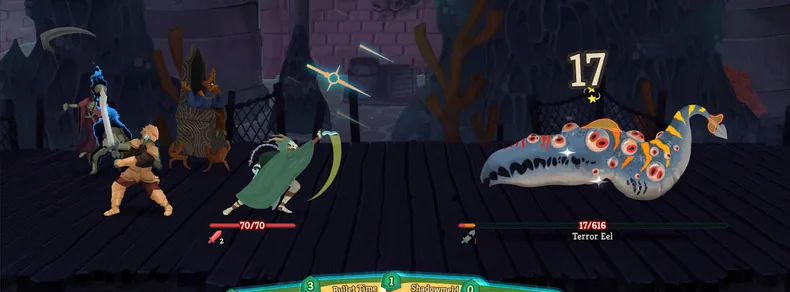
Slay the Spire 2's headline feature is the series' first online co-op: up to four players climbing one shared map, each playing their own class, all fighting the same enemies. Here is how hosting and joining works, plus the co-op rules that surprise new parties.
Before you start
- Every player needs the game on Steam (it is a paid Early Access title — no free weekend trick).
- Host and guests must be Steam friends to invite directly.
- The host needs a stable connection for the whole session — if the host drops, the lobby dissolves.
- Turn off all mods and trainers before matchmaking; they break sync.
Hosting a run
- Launch the game → main menu → Multiplayer.
- Choose Host and pick the standard mode.
- Select a save slot — you can open a fresh run or continue a single-player save; progress in that slot is shared with the lobby.
- Invite Friends and send invites from your Steam friends list.
- Once everyone has picked a character and readied up → Start Game.
Joining a run
- Main menu → Multiplayer → Join.
- Accept the Steam invite from your host, or find their lobby in the list.
- Pick your class, ready up, and wait for the host to start.
Co-op rules that change the game
- Shared save, shared unlocks. The lobby plays in the host's slot; characters and unlocks are shared progress.
- Enemies scale up with party size. Enemy HP jumps hard with each additional player; their damage mostly stays flat, so fights turn into longer slugfests, not deadlier ones.
- Separate card rewards, shared relics. Every player makes their own card picks and browses their own shop; relics are shared, and each player can grab only one when a reward offers duplicates.
- Simultaneous combat. Everyone plays cards at once, with effects resolving in play order. A downed player is not a wipe — they revive after the fight.
- Voted routing. The party votes on the next map node; majority rules. Argue before the vote, not after.
Quick troubleshooting
Lobby full of rubber-banding and freezes? See our connection fixes and performance guide — co-op sync is sensitive to packet loss, and most "host bug" reports are just an unstable uplink.
Keep reading: